
GAIA tool
Description
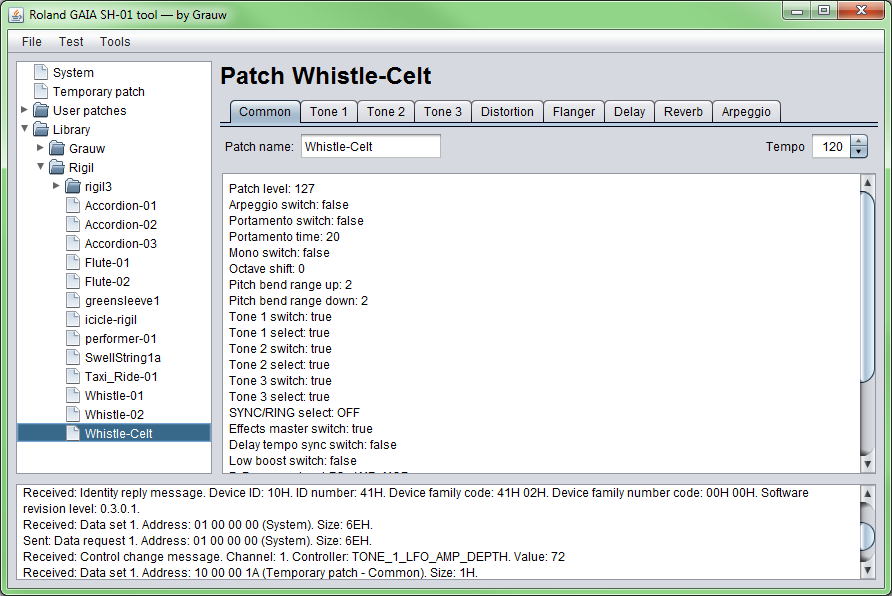
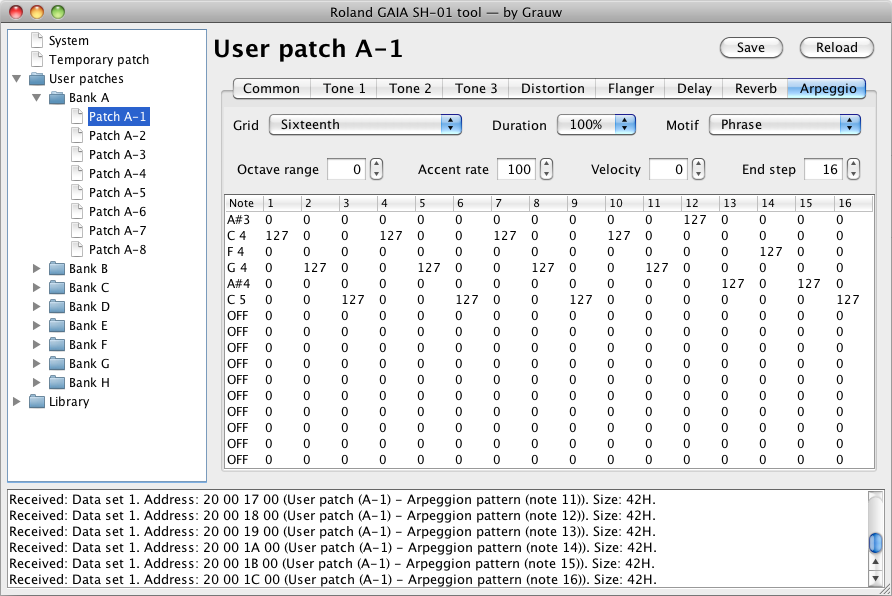
With this free tool for the Roland GAIA SH-01 synthesizer, you can view and edit your GAIA’s settings on your PC/Mac. Feature highlights:
- Arpeggio editing †
- Patch library to organise your patches †
- Saving and sharing patches
- Patch name editing
- Patch tempo editing
- Real-time synchronisation
† Only available in the GAIA tool!
For more info and ability to comment, see the related blog post: Introducing my Roland GAIA SH-01 tool, and some screenshots. You can also find me on Twitter.
Download
- GAIA tool 0.4 for Windows
- GAIA tool 0.4 for Mac OS X
- GAIA tool 0.4 for Java (cross-platform, OS X installation notes)
Please note that for all of these downloads, Java 6 must be installed.
If you encounter any issues please let me know and I will try to solve them. Also I’ll gladly hear about any suggestions or tips that you may have.
The source code is managed in a Mercurial repository. It is available under the Apache 2.0 license. Issues and feature requests are tracked here. Contributions are very welcome, be it in the form of ideas or documentation or code. Please drop me a note if you plan to!
Additional downloads
Extracted from the GAIA’s memory.
Media
Mac OS X JAR installation notes
The JAR version of the tool does not work out-of-the-box on Mac OS X; this is because of a bug in the OS X Java MIDI implementation which causes it to drop some MIDI messages that are vital for the tool to work. Fortunately there is a way to fix it, using the MMJ library. I’ll provide some brief installation instructions below.
Please note that the 0.4 Mac OS X app version of the GAIA tool includes MMJ, so these steps do not need to be followed (although they do no harm).
mmj - Midi for java on Mac OS X
- Get it from here: http://www.humatic.de/htools/mmj.htm
- Copy the mmj.jar and libmmj.jnilib files to /Library/Java/Extensions.
- (That’s the Library folder in the Mac location, not in User.)
- Everything should work now. If not, try to reboot the system.
Release notes
- Version 0.4 — 2012-10-14
- SVD file format support in library.
- Startup time improvement for large libraries.
- Version 0.3.1 — 2011-10-06
- Fixed reload button bug.
- Fixed tempo synced LFO rate control update bug.
- Fixed MIDI communication breakdown bug (firmware 1.03).
- Show GM parts switch system parameter (firmware 1.03).
- Load patch parameters on demand again.
- Version 0.3 — 2011-09-21
- Patch library to organise your patches.
- Much improved synchronisation. No control change should be missed now.
- Improved Mac OS X integration.
- Tabs in the patch view.
- Patch write protected status is now shown in System.
- Useless options from the test menu were removed.
- Windows and Mac OS X binaries.
- Version 0.2.1 — 2011-02-15
- Patch tempo editing
- Remember load/save dialog location
- Version 0.2 — 2011-02-06
- Patch name editing
- Loading and saving patches to disk
- MIDI device selection
- Sync panels with the GAIA
- Spinner values are now keyboard editable
- Tool tips stay visible longer
- Version 0.1 — 2010-12-19
- Added an arpeggio editor. Tracker-style!
- Added an introduction panel.
- Added the ability to reload parameters.
- Added the ability to save & sync arpeggio parameters.
- Lazy load parameter panels individually.
- Showing sent messages in the log.
- Version 0.0.4 — 2010-12-15
- Fixed master level value bug (thanks m0rfious).
- Fixed patch level value bug.
- Fixed filter resonance value value bug.
- Version 0.0.3 — 2010-12-13
- Made sure the tool always ends correctly.
- Added CTRL-Q shortcut for exiting the tool.
- Showing “OFF” in arpeggio patterns instead of G#9 as intended.
- Version 0.0.2 — 2010-12-12
- Now possible to view all user patch parameters
- Added a tree component to select which parameters to view
- Recognise all GAIA MIDI commands
- Showing more meaningful error message when unable to connect
- Corrected filter cutoff keyfollow display value
- Showing more meaningful original note value for arpeggio patterns
- Version 0.0.1 — 2010-12-07
- Initial development release